.png&w=1920&q=75)
- Date
How to Sell Products on WhatsApp in Nigeria: Create Your Catalogue and Turn Chats Into Sales

For many small businesses in Nigeria, WhatsApp has become part of everyday selling.
A customer might discover a product on Instagram, see it on a friend’s Status or receive a recommendation from someone they know. The next step is often the same: a WhatsApp message asking for the price, available colours, delivery information or simply, “Is this still available?”
That conversation can lead directly to a sale, which is one reason WhatsApp has become such a useful tool for small businesses.
WhatsApp Business goes beyond ordinary messaging, too. Businesses can create a profile, showcase products and services through a catalogue, share individual products with customers and, where available, allow customers to build an order using the shopping cart feature.
The opportunity, however, is not simply to get better at answering WhatsApp messages. A more useful approach is to build a simple sales process around the platform—one that makes your products easier to discover, easier to understand and easier to purchase.
Here’s how to do it.
1. Start With a Proper WhatsApp Business Profile
Before adding products, take a few minutes to make your business profile look and feel like a business.
WhatsApp Business allows businesses to provide information such as their business name, description, category, address and business hours. A website and business email can also be included, while some accounts can connect their Facebook or Instagram business profiles.
That information may seem basic, but it contributes to the first impression a potential customer gets when they open your profile.
A fashion business, for example, should make it immediately obvious that it sells clothing. A caterer should explain the type of catering offered. A nail technician might identify the services available and the areas served.
The less guesswork required, the easier it becomes for someone to decide whether they have found the right business.
2. Create a WhatsApp Catalogue for Your Products
The catalogue is one of the most useful features available to businesses using WhatsApp Business.
Rather than sending individual photographs every time someone asks what you sell, a catalogue gives customers somewhere to browse your products or services directly from your business profile. WhatsApp requires catalogue items to have a title, at least one image and a country of origin, while additional information can include a description, price where available, website link and product code.
Think of the catalogue as a small digital showroom.
A leatherworker might create separate listings for handbags, wallets and belts. A fashion designer could organize dresses, shirts and accessories. A food business might divide its offerings into meals, small chops, cakes and event catering.
The catalogue doesn’t need to contain every product you’ve ever made. Start with the products customers ask about most often and keep the information current.
How to add a product
The current WhatsApp Business process is straightforward:
- Open the Tools tab.
- Select Catalog.
- Tap Add new item.
- Upload your product photographs or videos.
- Enter the product or service name.
- Select the country of origin.
- Add information such as price, description, website link and product code where appropriate.
- Save the item to your catalogue.
WhatsApp currently allows up to 10 images or videos to be uploaded for a catalogue item. Catalogue content is also subject to WhatsApp’s review process before it becomes visible to customers.
The exact interface may vary slightly between devices and versions of the app, so follow the options displayed in your current WhatsApp Business account.
3. Treat Every Product Listing Like a Mini Product Page
Uploading a photograph and writing a product name isn’t enough.
A useful product listing should answer the questions a customer is likely to have before deciding whether to buy.
Consider a handmade leather bag. Instead of simply calling it “Leather Bag,” a stronger listing might say:
Handmade Leather Crossbody Bag
Handcrafted leather crossbody bag made in Nigeria. Available in brown and black, with an adjustable strap for everyday use.
Price: ₦35,000
Product code: BAG-001
The difference is small, but the second version gives the customer context.
Product descriptions matter most when an item comes in different sizes, colours, materials, or customization options. Customers should be able to understand what they are looking at without starting a conversation just to get basic information.
4. Take Product Photos That Show What You’re Selling
Good photography does not require an expensive camera or a professional studio.
A smartphone, natural light and a clean background can be enough to produce useful product images, provided the product is clearly visible.
Show more than one angle when the product has important details. A close-up can reveal the quality of leather, stitching, fabric or jewellery, while a photograph of clothing being worn gives shoppers a better sense of fit and scale.
For food businesses, presentation and portion size matter. Service businesses have a different challenge: photographs should demonstrate the actual service or finished result.
A nail technician, for instance, can show completed nail designs rather than relying entirely on promotional graphics. A photographer can display examples from different types of events. A caterer can show how an actual event setup looks.
The goal is not perfection. The goal is information.

5. Make Your Prices Easy to Find
One of the simplest ways to create friction in an online sale is to make customers ask for information that could have been provided upfront.
If a product has a fixed price, display it.
Instead of:
“DM for price.”
a stronger listing might say:
Handmade Leather Crossbody Bag — ₦35,000
Available in brown and black.
There are plenty of businesses where a fixed price isn’t possible. A caterer may need the number of guests before providing a quote, while a photographer may need to understand the type and duration of an event.
For standard products, however, transparency saves time on both sides.
It also means that the conversation can focus on the things that actually require a conversation.
Join the AFOMA Marketplace Launch Waitlist
6. Organize Your Catalogue as Your Business Grows
A catalogue becomes less useful when customers have to scroll through dozens of unrelated products to find what they want.
WhatsApp allows businesses to create collections within their catalogues, which can help customers find products and services more easily.
The right categories depend on the business.
A fashion seller might use:
- New Arrivals
- Women’s Fashion
- Men’s Fashion
- Accessories
A beauty business could organize its services under:
- Nails
- Hair
- Makeup
- Packages
A food business might use:
- Main Meals
- Small Chops
- Cakes
- Event Catering
Keep the structure simple enough that a first-time customer can understand it immediately.
7. Use WhatsApp Status to Bring Attention to Your Catalogue
Creating a catalogue doesn’t mean customers will automatically find it.
WhatsApp Status can help keep your products visible to people who already know your business. New arrivals, customer orders, behind-the-scenes content, testimonials and demonstrations can all become part of that content.
The important difference is that your Status should give people something useful to act on.
Instead of:
New bag available!
consider:
NEW ARRIVAL
Handmade leather crossbody bag
₦35,000
Brown or black
View product
WhatsApp allows businesses to share catalogue products through Status, chats and other channels, including links that can take someone directly to a catalogue item.
That makes the Status more than an announcement. It becomes another entry point into your product catalogue.
8. Give Customers Something They Can Click
There is a major difference between telling someone what you sell and giving them somewhere to browse it.
Imagine a customer asks:
“What bags do you have?”
Instead of searching through your camera roll and sending 15 photographs individually, a catalogue link can take the customer directly to the relevant products.
WhatsApp’s catalogue tools allow businesses to share an entire catalogue or individual products through chats, Status and other channels.
That creates a much cleaner interaction:
The customer can browse before deciding which product they want to discuss.
For a growing business, that small change can save a surprising amount of time.
9. Let Customers Build an Order
WhatsApp can also support a more structured ordering process.
Where the cart feature is available, customers can browse a business catalogue, add products to their cart and send the order to the seller. WhatsApp notes that the order is not final until the seller confirms it.
For a food business, this can be especially useful.
Rather than receiving a series of messages such as:
“I want two portions of jollof.”
followed by:
“Add chicken.”
and then:
“And two drinks.”
the customer can add the items to a cart and send the order together.
The seller still has to confirm the order and handle fulfillment, but the information is more organized from the beginning.
10. What Happens When the Customer Is Ready to Pay?
This is where it becomes useful to think beyond WhatsApp itself.
WhatsApp can handle an important part of the sales journey: product discovery, questions, conversations and, where available, order requests. The final payment process, however, may be better handled through a dedicated online checkout that is designed around the seller’s business.
Payment functionality within WhatsApp can vary by market and account, so businesses should not build their entire sales system around assuming that a particular payment feature will be available.
A more flexible structure looks like this:
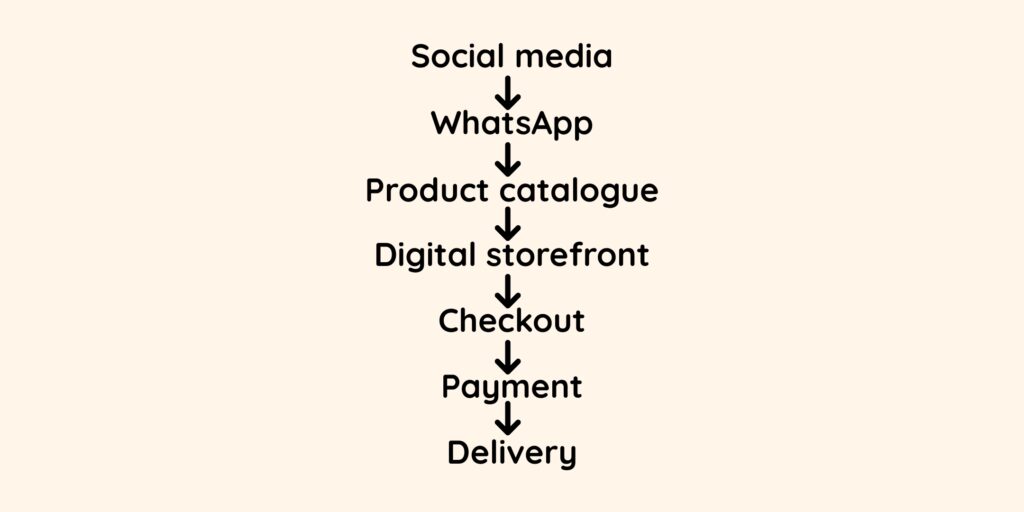
That approach gives each channel a clear job.
11. Connect Your WhatsApp Catalogue to Your Online Store
One of the most useful catalogue fields is the website link.
WhatsApp allows businesses to add a website link to a catalogue item, meaning the product listing can point customers toward a separate online destination.
This creates an opportunity to connect WhatsApp with a digital storefront.
Imagine that a customer sees a handbag in your WhatsApp Status. They tap the product link and see the catalogue listing. From there, a website link can take them to the product’s online page, where they can find additional information and continue through the available purchasing process.
The WhatsApp conversation doesn’t disappear.
It simply stops carrying the entire burden of the transaction.
12. WhatsApp and Your Online Store Should Work Together
There is no reason a small business has to choose between WhatsApp and an online store.
Each channel can play a different role in the customer journey.
Instagram and TikTok can introduce people to the business. WhatsApp can provide a direct line of communication when someone becomes interested. A digital storefront can organize products and services in one place, while a checkout system can handle the purchasing process.
That structure becomes increasingly valuable as the business grows.
For more on building an affordable storefront, read “How to Create an Online Store in Nigeria Without Spending a Fortune“.
13. Why Your WhatsApp Shouldn’t Be Your Entire Online Store
WhatsApp works extremely well for conversation.
The difficulty begins when every part of the business has to happen inside those conversations.
Imagine receiving hundreds of messages from customers asking about prices, sizes, colours, availability, delivery and payment. Answering each question individually might work when the business is small, but the process becomes increasingly difficult to manage as demand grows.
There is another limitation worth considering: people generally need to discover your WhatsApp number, Status or social-media account before they can interact with the business.
A digital storefront gives the business another destination that can be shared, linked to and discovered independently.
The point isn’t to replace WhatsApp.
The point is to stop asking WhatsApp to do everything.
14. What Should a Small Business’s Digital Storefront Do?
An online store does not have to begin as a complicated website with dozens of pages.
At its most basic level, the storefront should make it easier for someone to understand the business and decide what to do next.
A customer should be able to:
- Find the business
- Browse products or services
- See useful photographs
- Understand prices
- Read product information
- Learn about delivery or fulfilment
- Understand how to place an order
- Contact the business when they have questions
- Move toward completing a purchase
That foundation can become more sophisticated as the business grows.
For a deeper look at the costs and options, read “How to Create an Online Store in Nigeria Without Spending a Fortune“.
15. How AFOMA Marketplace Fits Into This
This is the problem AFOMA Marketplace is being built to address.
Many Nigerian small businesses have already started selling online. They have WhatsApp, Instagram, products, services and customers. What may be missing is a structured digital storefront that brings those pieces together.
AFOMA is being designed to give small businesses a place to present their products or services online without requiring them to build an expensive custom e-commerce website from scratch.
That doesn’t mean abandoning WhatsApp.
A seller can continue using WhatsApp to answer questions, share products and communicate with customers. Social media can continue bringing new people into the business. The difference is that there is also a dedicated storefront where customers can browse the business and move toward a purchase.
WhatsApp can start the conversation. Your storefront can help complete the journey.
Join the AFOMA Marketplace Launch Waitlist
16. A Simple WhatsApp Sales System
For a small business getting started, the entire process can be kept relatively simple.
1. Get discovered
Use Instagram, TikTok, Facebook and WhatsApp Status to introduce products or services.
2. Bring interested customers to WhatsApp
Give people somewhere to ask questions and start a conversation.
3. Show the catalogue
Rather than sending product photographs individually, direct customers to the relevant catalogue.
4. Give them a product link
When someone is interested in a particular item, provide the product or storefront link.
5. Complete the purchase
Move the customer through the available checkout and payment process.
6. Fulfil the order
Confirm the order, prepare the product and arrange delivery.
The process doesn’t need to be complicated. What matters is giving every stage a clear purpose.
Start With WhatsApp. Build Beyond It.
WhatsApp can be an excellent starting point for selling online in Nigeria. It gives small businesses a direct way to communicate with customers, showcase products and build relationships without requiring a complicated technology setup.
The next step is to make that process more organized.
Create the catalogue. Add useful product information. Use clear photographs. Share individual products instead of repeatedly sending the same images. Make the ordering process easy to understand.
Then consider what happens after the customer decides they want to buy.
A business becomes easier to buy from when the customer can move naturally from discovery to information, from information to trust, and from trust to purchase.
WhatsApp can play an important role in that journey.
It simply doesn’t have to carry the entire journey by itself.
Frequently Asked Questions
Can I sell products on WhatsApp in Nigeria?
Yes. WhatsApp Business provides businesses with tools for presenting products and services, communicating with customers and creating catalogues. The features available can vary by market and account.
How do I create a WhatsApp catalogue?
From the WhatsApp Business app, open the Tools tab and select Catalog, then add a new product or service. Images or videos, a product name and country of origin are required, while additional fields include price where available, description, website link and product code.
Can I add my website to a WhatsApp product?
Yes. WhatsApp allows a website link to be included with a catalogue item.
Can customers order products through WhatsApp?
Where the cart feature is available, customers can browse a catalogue, add products to their cart and send the order to the seller. The seller then confirms the order.
Can I share my WhatsApp catalogue on Status?
Yes. Businesses can share their catalogue or individual catalogue items through chats and Status, as well as through other channels.
Do I still need an online store if I sell through WhatsApp?
Not necessarily when you’re starting. As a business grows, however, a digital storefront can provide a dedicated place where customers can browse products, understand the business and move through a more structured purchasing process.
